Detailed Guide on Webbook and How to Make One
Summarize this blog with your favorite AI:
Detailed Guide on Webbook and How to Make One – TL;DR
Webbooks are digital books built with standard web pages that open instantly through a URL. They solve issues that PDFs and EPUBs struggle with by offering fast access, real-time updates, search visibility, and strong interactivity. They work well across education, documentation, training, and marketing because they remove friction for both creators and readers.
You can build Webbooks through no-code tools like KITABOO or through code-friendly docs-as-book workflows. A strong Webbook includes clear navigation, good accessibility, metadata, analytics, and flexible access control. With KITABOO, you can publish, secure, and monetise Webbooks with ease.
Here is a quick snapshot of what you’ll learn in this guide:
| Topic | What You Learn |
|---|---|
| What is a Webbook? | A digital book delivered as web pages, and opened through a URL. |
| Why Webbooks matter? | They offer fast updates, search visibility, and interactive reading. |
| Key use cases | Education, documentation, training, and marketing scenarios. |
| How to build one | Two paths: no-code platforms, or docs-as-book workflows. |
| Core features | TOC, search, deep links, progress, dark mode, and accessibility. |
| Protection needs | Access control, license rules, and platform-level DRM. |
| Monetisation options | Subscriptions, bundles, coupons, and marketplace distribution. |
| Why KITABOO | A no-code platform that simplifies creation, delivery, and protection. |
You have probably opened a PDF online and felt stuck. Maybe it loaded slowly or looked strange on your phone. You might have wished for something smoother and easier to read. That wish is exactly where the idea of a Webbook starts to make sense for you.
Readers want a better experience than traditional files can give. They want clear pages that work on any device. They want content that updates without effort. A Webbook gives you this kind of freedom while keeping your message strong and easy to follow.
Table of Contents
II. How Is a Webbook Different From a PDF or an EPUB?
IV. What Essential Features Should Every Webbook Include?
V. How Can You Protect and Monetise Your Webbook?
VI. Why Do Webbooks Matter Today?
VII. How Do Webbooks Compare With Book as a Website and EPUB on the Web?
VIII. Conclusion
IX. FAQs
What is a Webbook?
A Webbook is a digital book that opens in any browser and needs no downloads or special apps. It works through a simple URL that loads each chapter as a clean and readable webpage.
It keeps the reading flow familiar with a cover, a table of contents, and clear navigation. It can also support interactive features like videos, quizzes, and notes, which makes it useful for education, training, and product learning.
The W3C describes a web publication as a group of linked resources delivered on the open web. A Webbook follows this idea by treating every page, image, and media file as part of one structured reading path.
Many systems also use the Readium Web Publication Manifest to support this structure. This manifest is a JSON file that lists metadata and reading order. It helps reading systems understand how the book is organised. It also keeps the experience simple for readers who want easy access and smooth navigation.
When people search for what is a Webbook, they often look for guidance. You can see examples of popular Webbooks in online courses and product documentation.
How is a Webbook Different From a PDF or an EPUB?
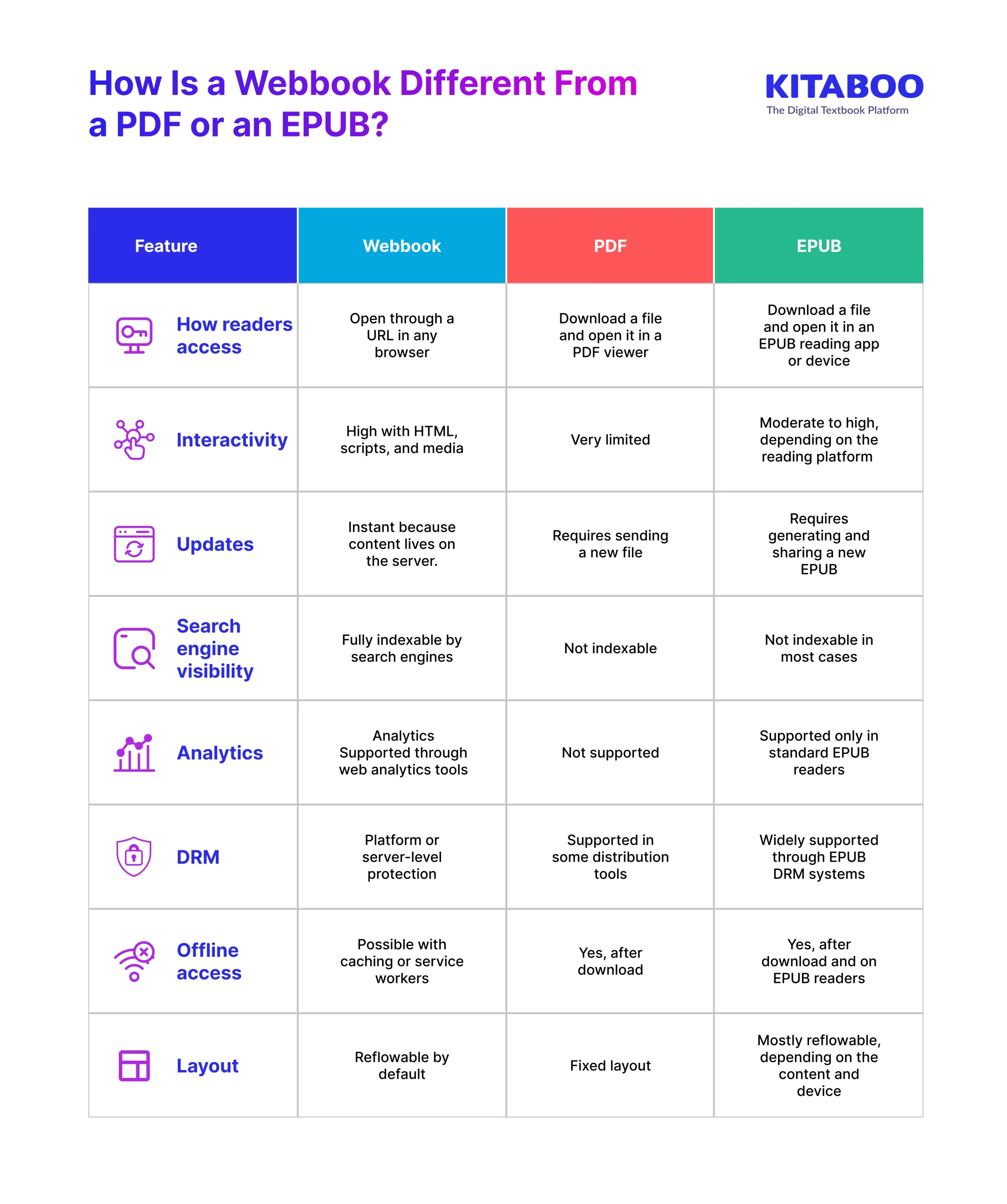
Readers often ask how a Webbook compares to other digital formats they already use. Each format has its own strengths, but the differences become clear when you look at access, interactivity, and flexibility. This table gives you a simple view of how these formats work in real use cases.
How To Make a Webbook?
You can build a Webbook in two reliable ways. Each path supports different needs and skill levels. One path helps you publish quickly with simple tools. The other gives you full ownership and deep control.
When you understand both paths, you can choose the one that fits your workflow. Both paths lead to a strong and effective Webbook. Choose the one that matches your goals, skills, and content needs.
1. No-code / Low-code Platforms
A no-code platform handles most of the technical work for you. It gives you a visual editor where you can create pages, arrange chapters, and add media. You do not need coding skills because the platform manages layout, hosting, and updates.
This approach is popular in education, training teams, and marketing units that want fast creation and smooth delivery. It also helps publishers who need simple workflows for frequent updates.
Steps to create a Webbook with a no-code tool:
- Create a new project inside your chosen platform.
- Upload your chapters or paste your content into the editor.
- Add a cover image and set metadata like title, description and author details.
- Build the table of contents with a clear chapter structure.
- Insert videos, quizzes or images using drag and drop tools.
- Adjust reading settings like font controls and navigation style.
- Review all chapters and check that the links work correctly.
- Turn on analytics if the platform supports tracking.
- Set access control for open or restricted reading.
- Publish and test the Webbook across different devices.
- Update content at any time because changes apply instantly.
2. Docs-as-Book (Code Friendly and Fully Ownable)
A docs-as-book setup gives you deep control over structure and design. You write in simple text formats and use a static generator to build clean HTML pages. You control accessibility, layout, and hosting.
This approach is common in developer documentation, product manuals, and technical resources that need long-term stability. It also suits teams that value full ownership and want to integrate the book into existing code workflows.
Steps to create a Webbook with a docs-as-book workflow:
- Write content in Markdown or AsciiDoc markup language.
- Organise chapters inside a clear folder structure.
- Use a static site generator to convert files into HTML.
- Create a clean layout that supports simple navigation.
- Add semantic HTML and alt text to improve accessibility.
- Add scripts or widgets for light interactive elements.
- Generate a Readium Web Publication Manifest for metadata.
- Add a service worker if you want offline access.
- Insert analytics by adding a tracking script.
- Automate builds so updates publish without delay.
- Host the final site on a fast Content Delivery Network.
- Manage versions to show readers what has changed.

What Essential Features Should Every Webbook Include?
A good Webbook feels smooth, clear, and simple to use. Your reader should move through chapters without confusion or effort. Each feature in this checklist improves the reading experience in a direct and practical way. These features also help your Webbook stay accessible, reliable, and easy to maintain.
1. Table of Contents and Persistent Navigation
A clear table of contents helps readers understand the full structure. It also helps them move between chapters without losing their place. Persistent navigation keeps important links visible at all times. This makes the reading flow steady and predictable. It also builds trust because readers feel guided.
2. Search
Search helps readers find exact sections without long scrolling. It makes complex books easier to explore. Readers can locate terms, steps or ideas very quickly. This saves time and reduces frustration. Good search also improves the overall reading experience.
3. Deep Links for Each Chapter or Section
Deep links let readers open a chapter with a direct link. This helps teachers, teams, and support agents share precise locations. It also helps users return to important sections with one click. Deep links support smooth communication across teams. They also improve navigation on mobile devices.
4. Progress Indicators
Progress indicators show how much of the book has been completed. They help readers track their journey and stay motivated. Clear progress also reduces confusion in long books. Readers feel more control because they can see what remains. This leads to better engagement with the content.
5. Dark Mode
Dark mode gives readers a comfortable view in low light. It also reduces eye strain for long reading sessions. Many users prefer it on phones and tablets. This feature creates a more personal reading experience. It also shows that your content respects user comfort.
6. Mobile-First Layout
A mobile-first layout makes your Webbook easy to read on small screens. Readers can access chapters anywhere with simple gestures. Clear spacing and readable fonts improve the experience. This layout also helps your content load faster on slow networks. It keeps your Webbook usable on all devices.
7. Accessibility
The importance of accessibility is crucial to make your book usable for everyone. Semantic HTML helps screen readers understand the structure. A proper heading hierarchy supports clear navigation. Alt text helps users understand images without visual cues.
Keyboard navigation and focus styles help users move without a mouse. Good contrast improves readability and supports WCAG 2.1 AA goals.
8. Manifest and Metadata
Metadata helps systems understand your book. It includes title, creators, and language. It also includes the reading order of chapters.
A Readium Web Publication Manifest or W3C-style manifest stores this data in a structured JSON file. It defines metadata, reading order, and linked resources. This helps reading systems understand how to load each part. It also keeps your Webbook consistent and easier to maintain over time.
How to Guide:
How to create a DRM protected eBook?
How Can You Protect and Monetise Your Webbook?
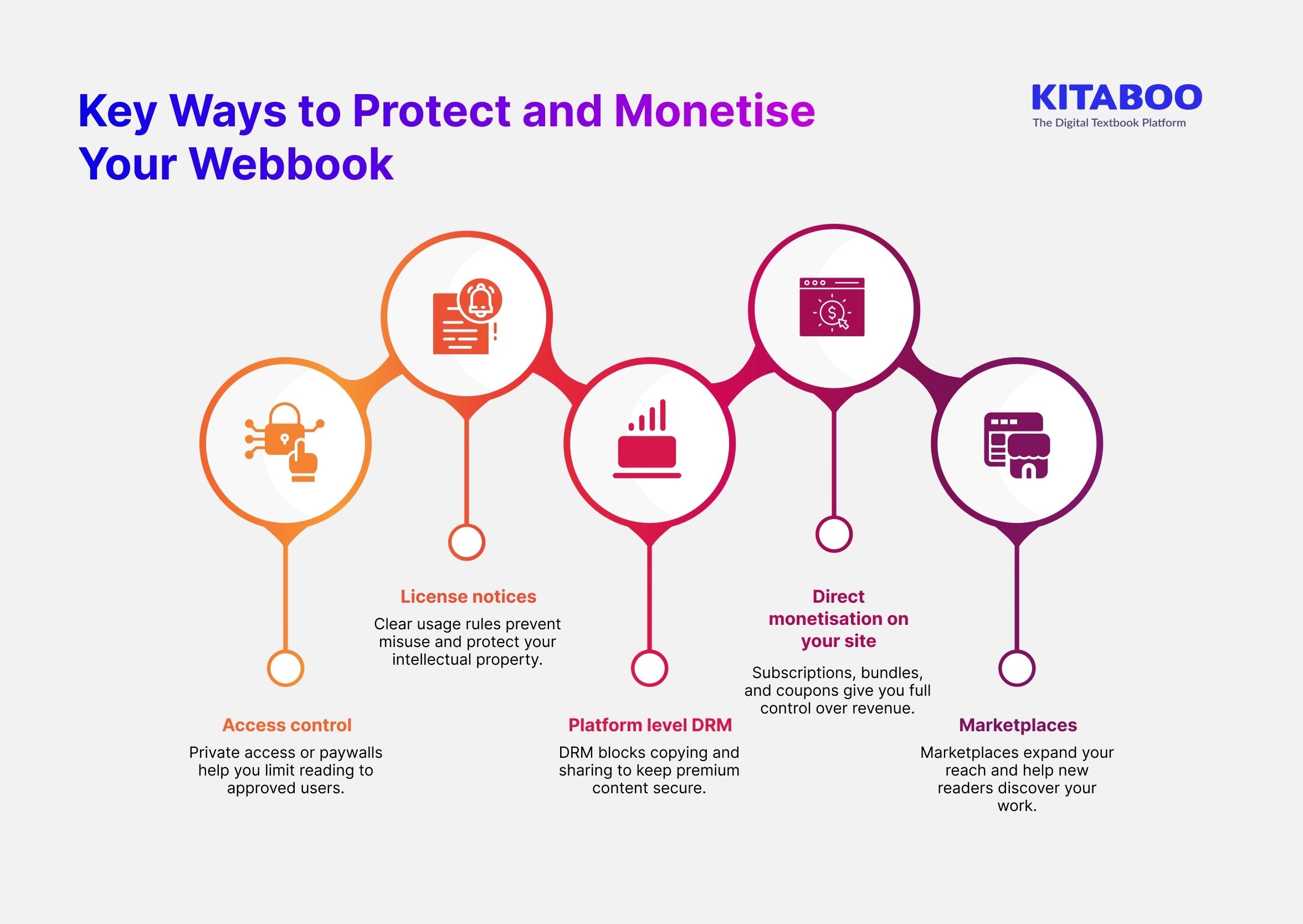
A strong Webbook needs clear rules, safe access control for secure digital reading, and steady earning options. Good control helps you protect your work and build value over time. These choices keep your book as a website model safe and reliable.
1. Access Control
Access control helps you monitor who can read your Webbook. You can use accounts to create a private entry. You can also set a paywall that unlocks content after payment. This helps protect sensitive or paid material. It also gives readers a safe and simple entry point.
2. License Notices
License notices tell readers how they can use your content. They set clear rules for sharing and reuse. This lowers the risk of misuse in public or private settings. It also protects your intellectual property. Clear rules create trust because readers understand the limits.
3. Platform Level Digital Rights Management (DRM)
Some platforms, like KITABOO, offer Digital Rights Management to protect paid or private content. DRM helps block the copying or sharing of restricted pages. It works well for premium training material or special guides. It gives creators more confidence when sharing important work. It helps maintain the value of content that needs protection.
4. Direct Monetisation on Your Site
Direct content monetisation gives you full control over sales. You can offer subscriptions for steady access. You can create bundles or coupons for flexible pricing. This gives you more ownership of user experience and revenue. It also helps you build a long-term reader base.
5. Marketplaces
Marketplaces help new creators reach large groups of buyers. They handle payments and discovery for you. This reduces setup time for early sales. Many creators use marketplaces while building their own site. They can also show examples of popular Webbooks to new readers.
Why Do Webbooks Matter Today?
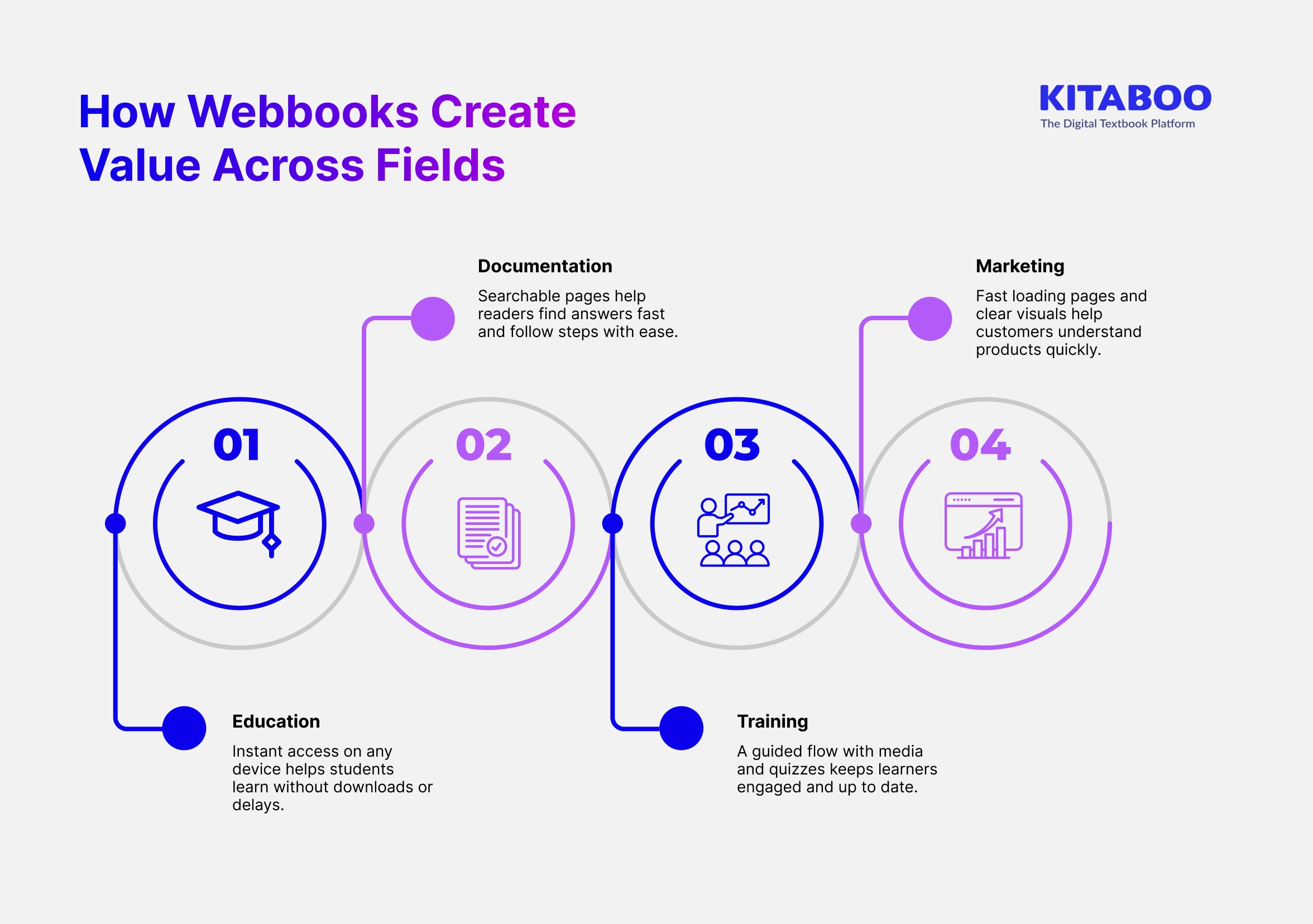
Many providers struggle to share content that feels modern and easy to read. You may face the same issue when your files feel slow or difficult to update. Webbooks solve these problems with clear structure, fast access, and simple sharing. They help you deliver content that feels fresh and always ready across industries and use cases.
1. Education
Webbooks open on any device with a simple link. Students read without downloads or special apps. Teachers can update lessons in minutes and keep all learners aligned. Interactive media supports a stronger understanding and better recall. Clear layouts also reduce cognitive load for young readers.
2. Documentation
Webbooks make long guides simple to explore. Readers can search, scan, and jump to sections quickly. Teams can update steps without issuing new files. This keeps all instructions current and correct. Search engines can index the content, which helps users find answers faster.
3. Training
Webbooks support structured learning paths for every skill level. Trainers can present videos, tasks, and quizzes in one flow. Learners always see the latest version when they reopen the link. Progress insights help trainers understand learner needs. Clear navigation also reduces drop-offs during long modules.
4. Marketing
Webbooks help brands share stories with clarity. Readers can open content instantly from any device. Marketers can use visuals, demos, and simple layouts to guide decisions. The content loads fast, which improves the first impression. SEO support also increases the reach of product information.
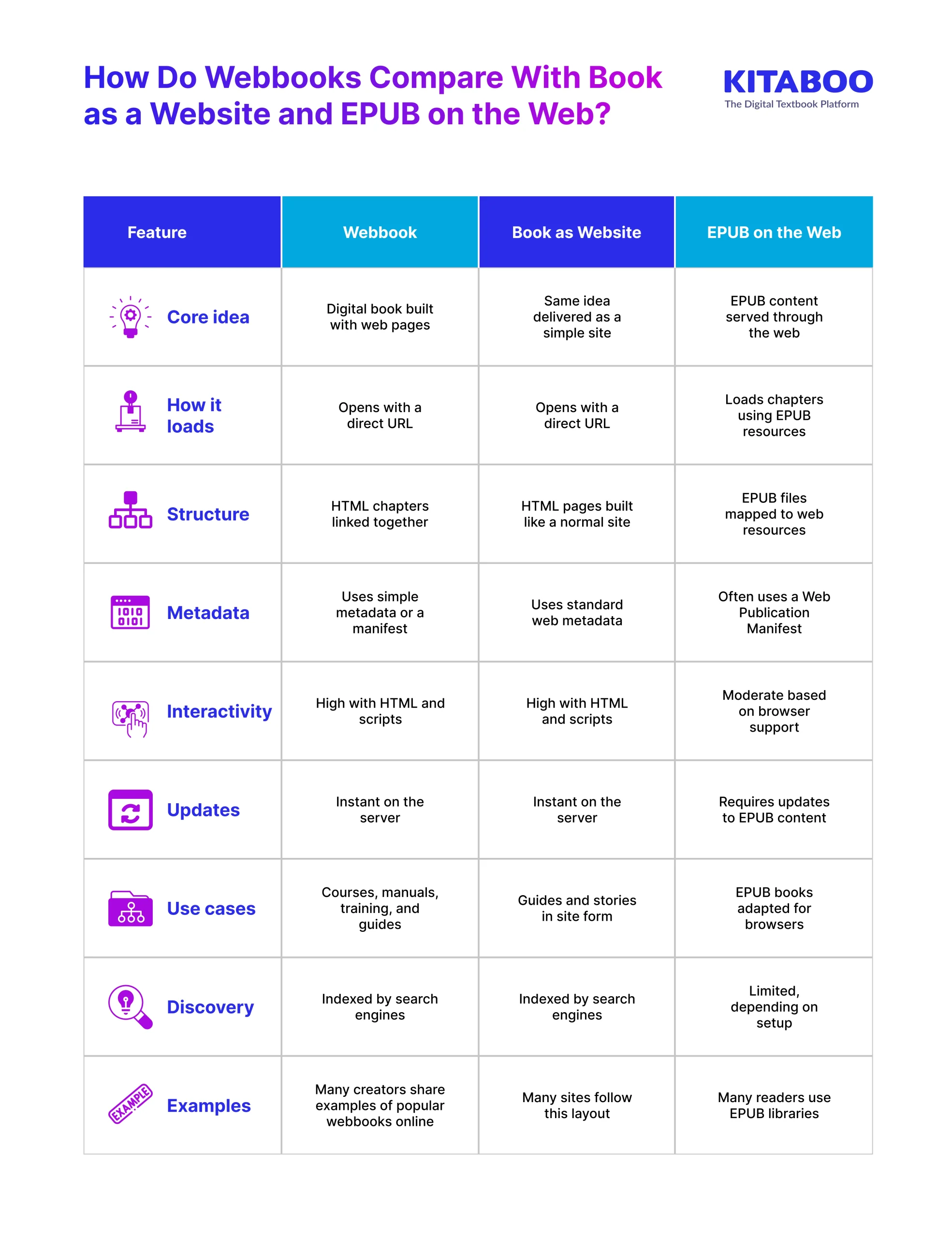
How Do Webbooks Compare With Book as a Website and EPUB on the Web?
Many readers see these terms and feel unsure about the differences. Each format uses the web, yet each one works in its own way. A simple comparison helps you choose the right format with confidence. It also shows how these formats support structure, access, and updates.
All three options support reading on the open web, but each one offers a different level of structure and control.
Conclusion
Webbooks give you a modern way to share content that feels clear, fast, and simple to use. They support education, documentation, training, and marketing by offering easy updates and smooth access on any device.
You now understand how Webbooks differ from older formats and how they can be created through fast no-code tools or flexible code-driven workflows. This makes the choice of the right platform an important part of the process.
This is where a strong no-code solution becomes very useful. KITABOO fits this need by giving you a complete platform to create and publish Webbooks without technical skills. You can design chapters, add media, update content, and control access in one space.
You also get analytics, protection, and a reading experience built for modern users. With KITABOO, you can build Webbooks that feel polished, reliable, and ready for every reader. Want to see how KITABOO can power your next Webbook? Book a demo today and explore the platform in action.
FAQs
A Webbook is a digital book built with web pages that open in any browser. It loads through a simple URL and supports easy navigation and fast updates.
A Webbook offers faster access and smoother updates than files. It also supports search, analytics, and interactivity across all devices.
Yes, many platforms convert EPUB files into web-friendly formats. You can import your EPUB and publish it as a clean, browser-based reading experience.
Yes, search engines can index Webbooks because they use standard web pages. This makes your content easier to discover online.
You only need a Webbook creation platform and a browser. A no-code tool like KITABOO lets you publish without technical skills.
Discover how a mobile-first training platform can help your organization.
KITABOO is a cloud-based platform to create, deliver & track mobile-first interactive training content.